Cerebras Cloud provides hosted inference for open-weight language models through a chat-completions API. You can try it from the Cloud Console or connect it to a Python application with Cerebras’ SDK or an OpenAI-compatible client. The important caveat is that “free” currently means a time-limited trial, not an unlimited allowance that renews forever: Cerebras’ documentation says new accounts receive $5 in trial credits after adding a verified payment method, and those credits expire after 30 days. Check the current terms in the Cerebras Cloud Console before planning a project.
This guide covers setup, authentication, model IDs, quotas, caching, image input, and what independent benchmarks can—and cannot—tell you about the exact endpoint on your account.
Create an API key and make a first request
Create an account at cloud.cerebras.ai, open API Keys, and create a key for your project. Treat it like a password: keep it on the server or local development machine, do not commit it to Git, and do not put it in browser JavaScript or a mobile app. If a key is exposed, revoke it and create another.
Set the key in the environment of the process that runs your code:
export CEREBRAS_API_KEY="your-api-key"
Install the official Python SDK:
python -m pip install --upgrade cerebras_cloud_sdk
Then send a chat completion. The current Shared Inference model ID used in Cerebras’ quickstart is qwen-3.8-27b:
import os
from cerebras.cloud.sdk import Cerebras

client = Cerebras(api_key=os.environ["CEREBRAS_API_KEY"])

response = client.chat.completions.create(
    model="qwen-3.8-27b",
    messages=[
        {"role": "system", "content": "Answer clearly and concisely."},
        {"role": "user", "content": "Explain what an API rate limit does."},
    ],
    max_completion_tokens=300,
)

print(response.choices[0].message.content)
The max_completion_tokens setting is a cap for generated output, not a promise that the model will use that many tokens. Keeping it close to the output size you actually need can also avoid reserving an unnecessarily large amount of token quota. See Cerebras’ Quickstart and model catalog.
Use the OpenAI-compatible endpoint
If your app already uses the OpenAI Python library, Cerebras documents an OpenAI-compatible interface. Set the Cerebras base URL, use the Cerebras API key, and pass the exact model ID:
python -m pip install --upgrade openai
import os
from openai import OpenAI

client = OpenAI(
    api_key=os.environ["CEREBRAS_API_KEY"],
    base_url="https://api.cerebras.ai/v1",
)

response = client.chat.completions.create(
    model="gpt-oss-120b",
    messages=[{"role": "user", "content": "Write a short Python function to clamp a value."}],
    max_completion_tokens=300,
)

print(response.choices[0].message.content)
The chat-completions endpoint is https://api.cerebras.ai/v1/chat/completions; its authentication header is Authorization: Bearer <API key>. OpenAI compatibility covers common workflows, but it does not mean every OpenAI parameter or feature behaves identically. Check Cerebras’ compatibility notes before depending on an advanced option.
Understand context and quota limits
A model’s context window is the total token space available to the request: input plus generated output, subject to provider and model constraints. A maximum completion is a separate cap on how many output tokens one response can generate. Neither is the same as requests per minute or daily quota. An API can reject requests because of a rate limit even when each prompt fits comfortably inside the context window.
Cerebras measures usage through request limits and token limits. Its general documentation describes separate total-token and uncached-token buckets. Total tokens include cached and uncached usage; uncached tokens are the portion that must be processed as a cache miss. Either bucket, or a request limit, can trigger a 429 Too Many Requests response. The exact limits depend on model, account, and project. You can see your current values under Limits in the Cloud Console; the public rate-limits page describes general tier limits and may not match every account.
The following is the quota table visible in the author’s account screenshot on October 17, 2026. These figures are preserved as shown; they are an account-specific snapshot, not a promise that every reader will see the same values.
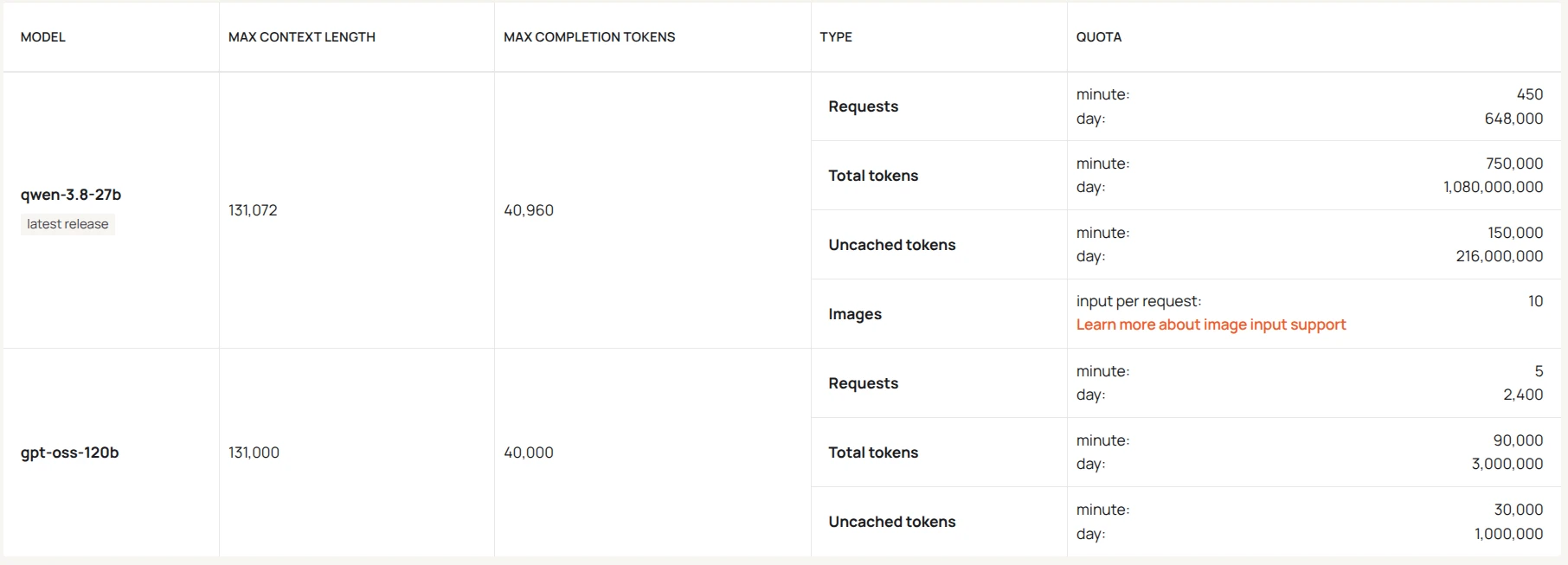
Account dashboard quotas shown in the screenshot
| Limit | qwen-3.8-27b (latest release) |
gpt-oss-120b |
|---|---|---|
| Max context length | 131,072 | 131,000 |
| Max completion tokens | 40,960 | 40,000 |
| Requests per minute | 450 | 5 |
| Requests per day | 648,000 | 2,400 |
| Total tokens per minute | 750,000 | 90,000 |
| Total tokens per day | 1,080,000,000 | 3,000,000 |
| Uncached tokens per minute | 150,000 | 30,000 |
| Uncached tokens per day | 216,000,000 | 1,000,000 |
| Image input per request | 10 | Not listed in screenshot |
The screenshot lists no image-input quota for gpt-oss-120b, so none is inferred here. It lists 10 images per request for Qwen. This is a screenshot value; the current public docs describe different image limits for the Free Trial tier and other account tiers. Check the Limits page for your project before building around image input.
The same public documentation currently describes Free Trial default limits that differ from this screenshot—for example, 5 requests per minute and 30K uncached tokens per minute for both listed models. It also says that project-level limits can apply. This is why the dashboard for your account should be treated as authoritative for your own quotas, while public tables are useful as general guidance. Current Free Trial access is credit-bounded and expires; do not assume the quoted dashboard allowances are permanent or automatically renewed.
What cached tokens mean
Cerebras prompt caching can reuse computation for matching prompt prefixes, including stable system instructions, tool definitions, and examples. Cache hits can reduce processing time and do not count toward the uncached-token bucket described in the rate-limit documentation. They still count toward the separate total-token bucket, and cache behavior or billing is not a reason to assume cached usage is free or unlimited. Caching works best when the reusable beginning of a prompt remains identical across requests. See the prompt-caching guide.
Comparing the two models
The model IDs shown in the screenshot are qwen-3.8-27b and gpt-oss-120b. The supplied dashboard quota snapshot gives Qwen substantially more request and token capacity, while gpt-oss-120b has a much lower per-minute request allowance on that account. That makes Qwen the more practical starting point for high-volume experiments under these particular quotas.
| Metric | Qwen3.8 27B (Xhigh) | gpt-oss-120b (High) |
|---|---|---|
| Artificial Analysis Intelligence Index | 34 | 12 |
| Output speed on model page | 41.3 tokens/second | 214.1 tokens/second |
| Context window on model page | 256k | 131k |
| Modality listed by Artificial Analysis | Text, image, and video input; text output | Text input and output |
| Total / active parameters | 27B / not listed | 117B / 5.1B |
| License listed | Apache 2.0 | Apache 2.0 |
The image-input value above is shown only for Qwen because the account screenshot lists no image quota for gpt-oss-120b. “Not listed in screenshot” does not mean zero, unlimited, or unsupported; check the model and project limits in your own Cloud Console.
These are Artificial Analysis model-level figures for the cited configurations, not measurements guaranteed for the exact endpoint in the author’s account. Its Qwen output speed and 3.99-second time to first token are based on Alibaba’s API. Its gpt-oss-120b page reports a 0.86-second time to first token based on the median across providers. Artificial Analysis separately reports Cerebras provider results for gpt-oss-120b: 1,737.4 output tokens/second and 1.57 seconds to first answer token in its provider benchmark. Those are benchmark workload results, not a service-level guarantee or an account quota. The current Qwen provider comparison does not list Cerebras among the providers it benchmarks. Compare the Qwen model page, gpt-oss-120b page, and gpt-oss provider benchmark for methodology and updated measurements.
The Intelligence Index is a composite score across multiple evaluations. It is not a percentage, an IQ score, or a guarantee of quality for your particular task. The Qwen value is specifically the estimated score for the Xhigh reasoning configuration. Model version, reasoning effort, provider, and serving setup affect observed results. The model pages also show token use and benchmark results; reasoning tokens consume output budget even when they are not shown as the final answer. Check those details when long reasoning traces matter to your quota.
Practical ways to choose
- High-volume free-trial experiments: Start with Qwen under the screenshot’s account limits, while keeping prompts and completion caps modest. Its high request and token quotas make it easier to run many small experiments in that account snapshot.
- Coding and reasoning: Test both on a fixed set of your own coding tasks. Qwen’s Xhigh evaluation has a higher Intelligence Index score, but it may be slower and more verbose;
gpt-oss-120bmay return tokens faster and can be useful when latency matters. - Automation and tool use: Either model can fit an agent loop, but measure complete task success, tool-call correctness, and total tokens used. Fast output alone does not make an automation reliable.
- Batch processing: Use bounded output sizes, record failures, and pace jobs according to the strictest request or token limit shown for your account. Split large jobs into resumable chunks instead of retrying an entire batch after a
429. - Image experiments: Qwen is the one of these two models with documented shared-inference image input. Cerebras currently labels image inputs as preview capability; send supported image content using the documented format and stay within your project’s image and payload limits. Don’t assume
gpt-oss-120baccepts images.
Errors, monitoring, and security
An HTTP 401 usually means the key is absent, invalid, or unavailable to the process. A 404 can indicate a misspelled, deprecated, or unavailable model ID. A 429 means a request, token, or project limit was exceeded; inspect the error details, reduce concurrency or max_completion_tokens, and retry with backoff after capacity replenishes. Do not immediately replay a large batch at full speed.
Use the Cloud Console’s usage and limits pages to compare actual consumption against your plan. Keep keys in environment variables or a secrets manager, restrict access to them, and avoid logging authorization headers or sensitive prompts. Never ship a private key in client-side code.
Recommendation
For a developer starting with the account limits shown here, Qwen is the sensible default for repeated free-trial experiments because its screenshot quotas are much larger and it supports image input. Try gpt-oss-120b when you want a faster text-only alternative or want to compare its behavior on a particular reasoning or automation task. Keep a small evaluation set, measure useful completed work rather than tokens per second alone, and re-check your Cloud Console limits before relying on any quota for a larger project.